MiniBook WordPress & HTML Plugin
Posted: Sat Dec 20, 2025 4:46 pm
MiniBook WordPress & HTML Plugin
Introduction
The MiniBook WordPress / HTML plugin is an extension of the MiniBook ecosystem that allows radio amateurs to publish live station information directly to a website.
Its purpose is simple and focused:
Why a Web Plugin?
Many radio amateurs like to show:
How It Works – High-Level Overview
The plugin operates on a push-based model:
Supported Output Modes
WordPress Plugin Mode
When installed as a WordPress plugin, MiniBook data can be displayed using: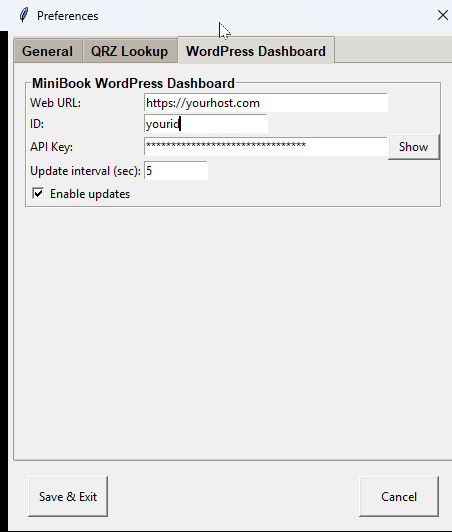

Standalone HTML Mode
For users who do not run WordPress, MiniBook can also generate: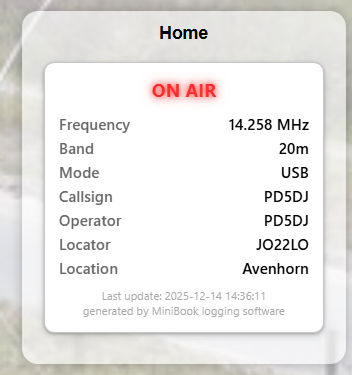
Embedded with IFRAME:
Using Shortcodes, Widgets & Embedding
Shortcodes in Pages and Posts
MiniBook provides a shortcode that can be placed directly inside a WordPress page or post.
This allows the live station status to appear as part of normal page content.
Result
of Shortcodes
Shortcodes are ideal for:
The plugin can also be used as a sidebar widget.
This is especially useful for: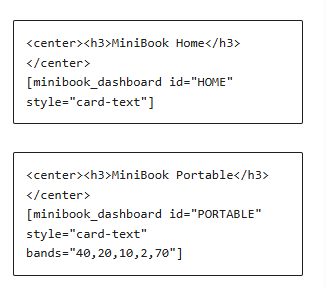
Displayed Information
The plugin is intentionally limited to operational status, not logging details.
Typical displayed fields include:
Security & Design Philosophy
Security and data integrity were key design goals.
The plugin:
Performance & Reliability
The MiniBook WordPress / HTML plugin is designed for continuous operation:
What This Plugin Is NOT
To avoid confusion, the plugin is deliberately not:
Typical Use Cases
The WordPress / HTML plugin is a natural extension of MiniBook’s modular design:
Conclusion
The MiniBook WordPress / HTML plugin provides a clean and reliable way to bring your station from the shack to the web.
No cloud dependency, no unnecessary features — just a simple, honest reflection of what your station is doing right now.
Simple, transparent, and under the operator’s control.
Introduction
The MiniBook WordPress / HTML plugin is an extension of the MiniBook ecosystem that allows radio amateurs to publish live station information directly to a website.
Its purpose is simple and focused:
The plugin is not a remote-control interface, nor a cloud service. It is a presentation layer that reflects what is happening in MiniBook, nothing more and nothing less.Expose real-time operating status from MiniBook to the web — cleanly, safely, and without complexity.
Why a Web Plugin?
Many radio amateurs like to show:
- Whether their station is currently ON AIR or OFF AIR
- Which band, frequency, and mode they are operating
- Live activity during portable operations or special events
- Manual website updates
- Custom scripts
- External services or cloud platforms
How It Works – High-Level Overview
The plugin operates on a push-based model:
- MiniBook generates live station data
- MiniBook sends updates to the website at regular intervals
- The plugin stores the latest snapshot
- WordPress (or plain HTML) displays this snapshot
- No polling from the website
- No direct database access from MiniBook
- No persistent connection required
Supported Output Modes
WordPress Plugin Mode
When installed as a WordPress plugin, MiniBook data can be displayed using:
- Shortcodes inside pages or posts
- Sidebar widgets
- Theme-integrated blocks
- Live station dashboard page
- Sidebar ON AIR indicator
- Portable operation status page
Screenshot placeholder:
Screenshot 1 – MiniBook Preferences page showing WordPress connection parameters
Additional screenshot placeholder:
Screenshot 1a – Location of the API key inside MiniBook
Standalone HTML Mode
For users who do not run WordPress, MiniBook can also generate:
- Static HTML snapshot files
- Hosted on any standard web server
- Personal websites
- Club pages
- Event or expedition pages
Screenshot placeholder:
Screenshot 4 – Embedded HTML snapshot shown inside an iframe
Embedded with IFRAME:
Code: Select all
<iframe src="https://yourdomain.com/wp-content/uploads/minibook/qrz-YOURID.html" width="100%" height="300" frameborder="0" scrolling="no"></iframe>Shortcodes in Pages and Posts
MiniBook provides a shortcode that can be placed directly inside a WordPress page or post.
This allows the live station status to appear as part of normal page content.
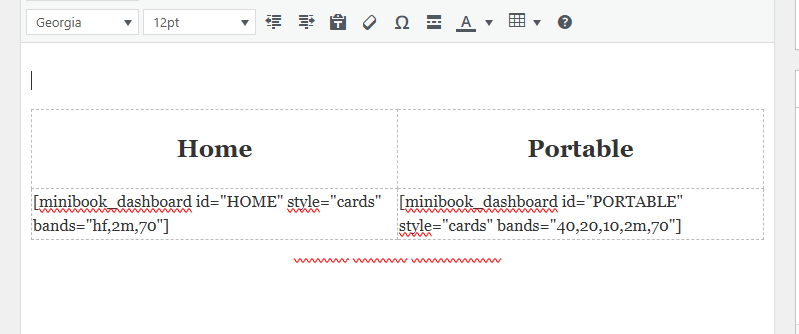
Screenshot placeholder:
Screenshot 2 – WordPress editor showing the MiniBook shortcode inside a page or post
Result
of Shortcodes
Shortcodes are ideal for:
- Dedicated station pages
- Special event pages
- Portable operation summaries
The plugin can also be used as a sidebar widget.
This is especially useful for:
- Persistent ON AIR / OFF AIR indicators
- Compact live frequency displays
- Always-visible station status
Screenshot placeholder:
Screenshot 3 – MiniBook widget configured in a WordPress sidebar
Displayed Information
The plugin is intentionally limited to operational status, not logging details.
Typical displayed fields include:
- ON AIR / OFF AIR status
- Callsign
- Frequency
- Band
- Mode
- Operator name (optional)
- Timestamp of last update
Security & Design Philosophy
Security and data integrity were key design goals.
The plugin:
- Accepts only inbound updates from MiniBook
- Does not allow remote commands or control
- Stores no credentials from MiniBook
- Keeps data isolated per station or ID
Performance & Reliability
The MiniBook WordPress / HTML plugin is designed for continuous operation:
- Minimal file I/O
- No background cron jobs required
- No heavy database queries
- Graceful handling of missed updates
What This Plugin Is NOT
To avoid confusion, the plugin is deliberately not:
- A remote logging interface
- A web-based MiniBook replacement
- A real-time rig control system
- A contest scoreboard or statistics engine
Typical Use Cases
- Home station status display
- Portable / POTA / SOTA operation pages
- Club station activity dashboards
- Special event stations
- Public-facing station information
The WordPress / HTML plugin is a natural extension of MiniBook’s modular design:
- MiniBook handles logging and station logic
- HamlibServer handles rig control
- DXCluster handles spotting
- The web plugin handles presentation only
Conclusion
The MiniBook WordPress / HTML plugin provides a clean and reliable way to bring your station from the shack to the web.
No cloud dependency, no unnecessary features — just a simple, honest reflection of what your station is doing right now.
Simple, transparent, and under the operator’s control.